Find the POS settlements that never reached your bank.
When sales come in through POS terminals and transfers at several banks, money goes missing in small amounts: a day’s card sales that never settle, a payout that lands short, charges nobody has posted. Brillrec checks each day’s approved POS sales against what actually reached the bank, and keeps every difference open until someone explains it.
14 days free. No card needed. Plans from ₦75,000 a month plus VAT.
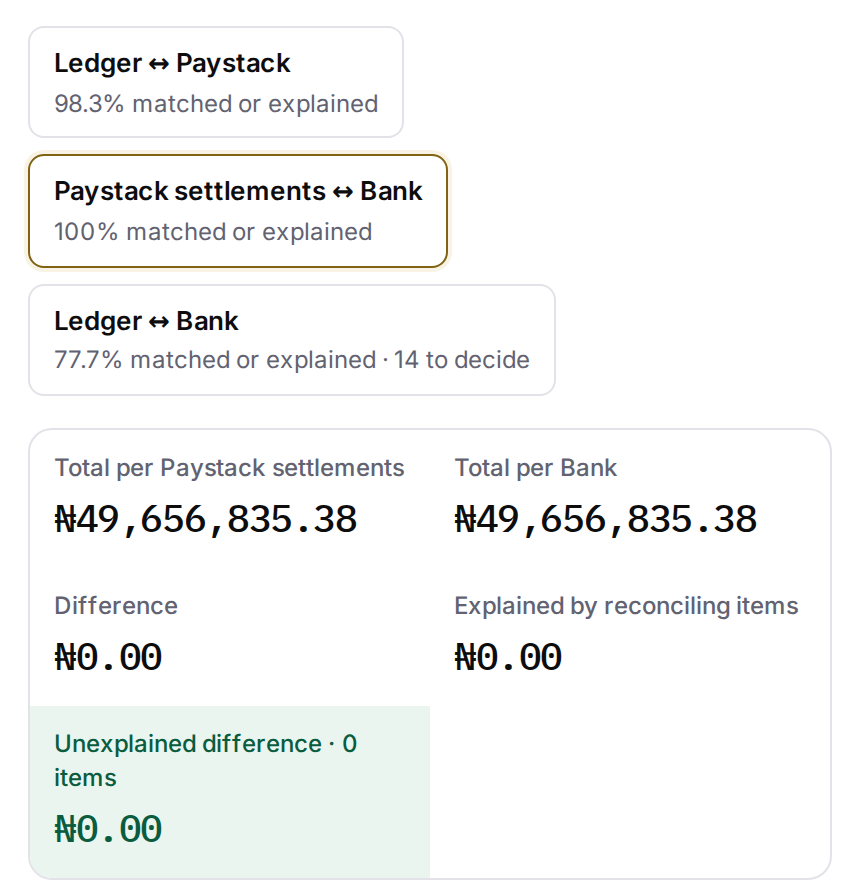
Sample data
- 70%reduction in month-end close time
- 84%of clients’ bank and ledger lines matched automatically in a month
Reported by clients; the matching figure was measured in Brillrec. See what clients reported →
Where the money goes missing
Settlements that never arrive
A day’s approved card payments with no matching bank credit, shown by date and terminal.
Payouts that land short
What reached the bank compared with the sales less the charges on the processor’s report.
Fees above the published price
For Paystack, Flutterwave and Monnify, the fee on every payment is recomputed against the provider’s published local prices, and overcharges are listed by month.
Bank charges nobody has posted
Hundreds of NIP transfer charges and levies, explained in one step and sent to the journal export.
How Brillrec checks it
Bring in the records
Each bank statement and each POS or processor report, as PDF, Excel or CSV in the layout the bank or provider sends. Or connect Paystack, Flutterwave, Monnify, Squad, Fincra, Paga or VFD Bank, and your banks through Mono.
Brillrec reads the POS report
Terminal IDs, approved and declined responses, fees and net amounts. Declined payments are left out. Where the report has no settlement IDs, each day’s approved payments become one expected payout, and Brillrec tells you it has done so.
Every expected payout is matched to the bank
What doesn’t match stays open with its amount and date, and can be assigned to someone with a due date.
Review and sign off
A preparer, an approver and a reviewer, each recorded, and a sign-off pack for every account each month.
Built for many outlets and several banks
- One price per organisation with unlimited team members: outlet accountants, head-office finance and the reviewer all sign in.
- Each bank account and each POS or payment account is reconciled on its own schedule, and the close board shows which are signed off and which are overdue.
- Several banks and daily checks: the Professional plan covers up to 15 bank, POS and payment accounts and daily reconciliations, at ₦175,000 a month plus VAT. Smaller set-ups start on Essential at ₦75,000.
Every bank and POS account, checked the same way.
The video follows a bank reconciliation: records brought in as they come, every match shown with its reason, and the statement reviewed before anyone signs off. POS settlements follow the same steps, with each day’s approved sales matched to what reached the bank.
Questions
Which POS reports can it read?
Moniepoint exports are recognised by name. Other bank and provider POS reports are read by their columns: terminal ID, reference, response code, amount, fee and net amount.
Do we have to send you our data to see it?
No. The demonstration uses Brillrec’s sample data. Bring a question about your own bank’s statement layout and we’ll show how Brillrec reads that kind of file. The trial also includes a sample reconciliation you can open in one click.
What happens to declined card payments?
They are left out of the settlement check and counted, so they don’t show up as false differences.
Can it check the fee our bank charges on POS?
Fees are recomputed for Paystack, Flutterwave and Monnify against their published prices. For bank POS, Brillrec checks that each day’s net amount reached the bank and shows any difference.
Two-factor sign-in · Preparer, approver and reviewer stages · Tamper-evident audit log · NDPC-registered · Brillrec Ltd, Lagos
See it in 20 minutes.
We show how Brillrec checks a month of POS sales against the bank, on sample data. Bring a question about your own bank’s statement layout and we’ll show how Brillrec reads that kind of file. Nothing of yours needs to leave your office.